[SOLVED] Remove a module....

GK User
Tue Nov 29, 2011 8:23 pm
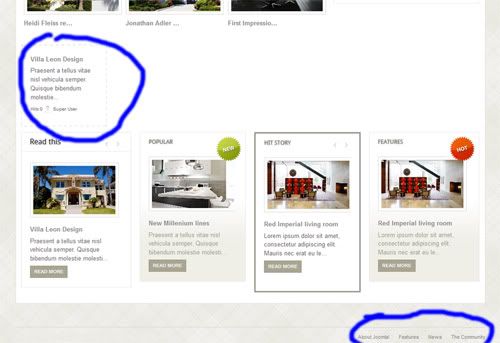
Hello! It's my first Gavick's joomla template and It's very beautiful. I have a little problem. How I remove the module (if it's a module) that I signed in the screenshot below? And...how remove the footer menu composed by About Joomla, Features, News, The Community?

Thank's in advance! B)

Image
User avatar
Junior Boarder

GK User
Wed Nov 30, 2011 10:15 am
Simply go to Extensions > Module Manager , find them and disable them.

Left top module details are as below:
Module Name: Top Story
Module Position: inset1
Module Type: mod_news_pro_gk4


Bottom Menu details are as below:

As a Menu to Edit :
Menu Name: Footer Menu

As a Module:
Module Name: Footer menu
Module Position: footer_nav
Module Type: Menu
User avatar
Platinum Boarder

GK User
Wed Nov 30, 2011 11:47 am
Thank you very much NormanUK.
I have another question... :)
Where I can modify the text "Lowest Prices" in home page?

Thank's in advance!
User avatar
Junior Boarder

GK User
Wed Nov 30, 2011 12:19 pm
That's again in module manager.

Module Title: Lowest Prices
Module Position: top
Module Type: mod_news_pro_gk4

See you around...
User avatar
Platinum Boarder

GK User
Wed Nov 30, 2011 7:36 pm
Thank's a lot NormanUK. It was a my distraction! I found all module! ;)

ByeBye
User avatar
Junior Boarder

GK User
Wed Nov 30, 2011 10:20 pm
No problem at all , marking this topic as solved.

See you around...
User avatar
Platinum Boarder


cron