customize template

GK User
Thu Mar 05, 2015 5:01 pm
Hello everyone.
I would like to help me customize the template.

first:
How do I remove that area that is painted? I do not want to place any photo there, least in this category of items I do not want pictures here
Image

second:
I'm introducing that video through the embbed of k2, How I put the text after the video?
http://s30.postimg.org/g6xro13z5/image.png

third:

how I change this view when I click a tag?

http://s14.postimg.org/rabs24prl/image.png


thanks
Regard

User avatar
Fresh Boarder

GK User
Thu Mar 05, 2015 9:01 pm
Hi,
ad 1) request CSS changes / override.
ad 2) Request customization of view - php/html changes
ad 3) It depends what effect you need

But as you may know .... we don't provide customization , this is issue forum, not template workshop :whistle:

(1) - if you have URL of www - I can give you a clue
User avatar
Platinum Boarder

GK User
Fri Mar 06, 2015 12:41 am
Thanks for sending me URL
ad 1) Please use:
Code: Select all
#gk-content.no-breadcrumb {padding: 0;}
#gk-mainbody {    padding: 40px 0 124px;}


How? check my footer link guide.
User avatar
Platinum Boarder

GK User
Fri Mar 27, 2015 6:16 pm
Hello

it is possible I put a video on the first page of the site as it has in quark template?
User avatar
Fresh Boarder

GK User
Fri Mar 27, 2015 6:48 pm
it theory it;s possible but to get this same appearance it request you to take some CSS code (and maybe more) from Quark.
Much easer it will be just publish a video player module
User avatar
Platinum Boarder

GK User
Fri Mar 27, 2015 9:00 pm
I dont know to do this oscar.

Someone is available to make this alteration? I paid for the work
User avatar
Fresh Boarder

GK User
Fri Mar 27, 2015 9:38 pm
It depends which option you will choose ?

1) Exactly like it was in Quark
2) Just a Video player but of course without some of typical control buttons.
User avatar
Platinum Boarder

GK User
Sat Mar 28, 2015 12:44 am
Hello oscar.
Thanks for your help.
I have an account on vimeo and have customized the embed code and I'll upload a custom image is was good for my site.
Can you tell me how to remove the blank space appear in frontpage after header position?

I'm a vidographer not a professional programmer :D
I hope understand my doubts
User avatar
Fresh Boarder

GK User
Sat Mar 28, 2015 6:27 pm
If you can show me your URL it will help me much more than talking about screenshots.
User avatar
Platinum Boarder

GK User
Mon Mar 30, 2015 12:30 pm
Hello

I got resolve the problem of white space with this tutorial

https://www.gavick.com/documentation/un ... omla-pages

I wanted the bottom position does not appear version PC, how I do that?

I was reading this tutorial https://www.gavick.com/documentation/un ... let-layout

but not helping me.

any help?
User avatar
Fresh Boarder

GK User
Tue Mar 31, 2015 4:03 pm
any help?
User avatar
Fresh Boarder

GK User
Tue Mar 31, 2015 6:54 pm
No URL no help, easy
User avatar
Platinum Boarder

GK User
Tue Mar 31, 2015 7:09 pm
User avatar
Fresh Boarder

GK User
Wed Apr 01, 2015 10:55 am
Hello

how I put the bottom position does not appear in the PC version?

site: http://www.qfilm.pt
User avatar
Fresh Boarder

GK User
Wed Apr 01, 2015 4:51 pm
paulo.joomla wrote:Hello

how I put the bottom position does not appear in the PC version?

site: http://www.qfilm.pt


why the k2 filter articles dont work?
http://www.qfilm.pt/portefolio.html

any idea
User avatar
Fresh Boarder

GK User
Fri Apr 10, 2015 9:55 pm
Filter works , but you have to click on "black" name
User avatar
Platinum Boarder

GK User
Fri Apr 10, 2015 9:59 pm
probably not all suffix works for all positions in that template.
Each template have it's own properties.

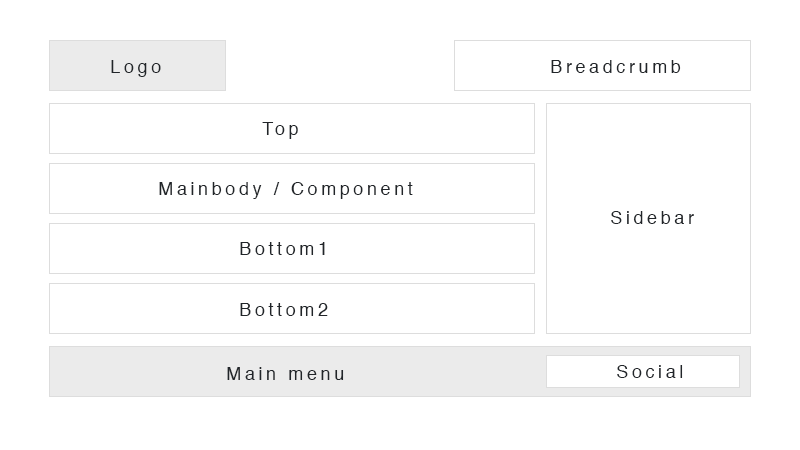
You thought about bottom1 or bottom2 ? https://demo.gavick.com/joomla25/photo/ ... itions.png
User avatar
Platinum Boarder

GK User
Sat Apr 11, 2015 12:36 pm
I oscar All problems is solved!

thanks
User avatar
Fresh Boarder


cron